
If you’re unfamiliar with Instagram or hesitant to start using it for your brand, it’s time to acquaint yourself with this powerhouse social media platform and get going today with it. Why? Here’s just a few reasons that should peak your interest:
- 55% of US 18-29 years old are Instagram users (prime Millennial audience)
- It now has 600 million total users and 400 million daily active users
- 35% of users say they look at the platform multiple times a day
And some more stats that will speak more directly to why brands need to be on Instagram:
- 50% of users follow at least one business
- 65% of users say they have learned about a product or service from the platform alone
- 75% of Instagram users take action like visiting a website after looking at an Instagram advertisement
- Best stat yet, and a reason behind why so many brands are gravitating more towards campaigns on Instagram? The platform boasts a 0.84% engagement rate. While that number might seem low, it beats out Twitter’s depressingly low 0.04% and Facebook’s 0.53% as well.
So in an effort to continue its success and offer more tools to users, Instagram has over the years released new features, including whole new apps (Boomerang and Layout) that provide exciting photo editing opportunities. But their biggest addition as of late, has been the Stories feature, which now also includes the ability for live videos.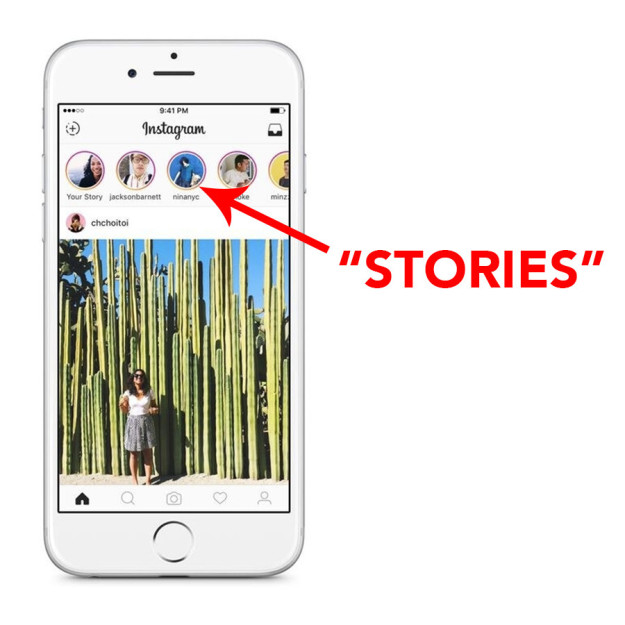 Similar to Snapchat, Stories provide a very immediate and real-time feel to the platform that is separate from the newsfeed and only last 24 hours before disappearing. When initially released, many people doubted the Stories feature saying it was a rip off of Snapchat and that it wouldn’t last. Well, 8 months later, Snapchat Stories are actually struggling and have seen a decrease in average views of about 40%. Compare that to Instagram Stories which are now flourishing; 200 million people are using Stories every day and are seeing a 28% higher open rate than Snapchat as well.
Now to the big question; how do I use the Instagram Stories for my brand?
The Stories feature can be found at the top of the Instagram screen once you initially open the app and appear as a string of profile icons of the people and brands you follow (please remember that only the people that follow you will have your stories appear in their app). Now you might asking, how do people who aren’t following me see my Stories? Good question. Once you’ve added an image or video to your Story, a colored ring around your profile picture will show up notifying anyone who comes across one of your posts or profile that you have Stories to view. All they have to do is click on your profile picture and they can see them.

Stories example from Chobani
Few other technical details to know first about Stories:
- Images and videos posted as a Story are only available for viewing for 24 hours before they disappear from your profile
- Once someone is viewing your Story, they can see a small bar (or bars) at the top that notifies them as to how many pieces of content are within your full set of Stories
- Viewers can view your stories as many times as they want
Now, onto how you actually post a Story.
- Click on your profile icon or swipe right on the home page – you will be brought to your camera
- From here you have a few options on what type of Story format to post:
- Take a normal photo by just pressing the white button (you can switch to selfie mode by tapping the two arrows icon to flip the camera)
- Swipe Right under the button to start a Live video
- Swipe Left under the button to take a Boomerang video or a Hands-Free video
- Swipe Up to upload an image that you have saved on your camera
- Once you have your photo or video captured, it will bring you to the next screen where you can add text or stickers (small icons related to location, temperature, events, etc)
- You can also save your video or photo at this moment too by tapping the Save icon in the bottom left
- Once you have your text and stickers in place, just tap the Your Story icon and your Story will be published
A few notes about some of the features mentioned above:
- Boomerang: a boomerang is a short video (10 seconds) that plays forward and backward on repeat
- Live: a real-time video that is shared in your Stories to your followers – once the video is over, the content is no longer available adding to the “in the moment” feel
- Hands-Free: a video where you don’t have to keep holding the record button (just tap to stop recording)
- Normal: along with adding text and stickers, you can now also mention and tag other Instagram profiles (viewers can access by clicking the profile name on your Story image)
When it comes to Instagram, don’t post just to post. Instead, focus on driving content that your viewers will actually enjoy and want to see. Key word there, “enjoy.” This is a great way to share small inside moments from your company, your employees or highlight product features that aren’t salesy. The last thing you want to do is annoying your follower. Check out this great infographic from Sprout Social that highlights annoying things brands can do.
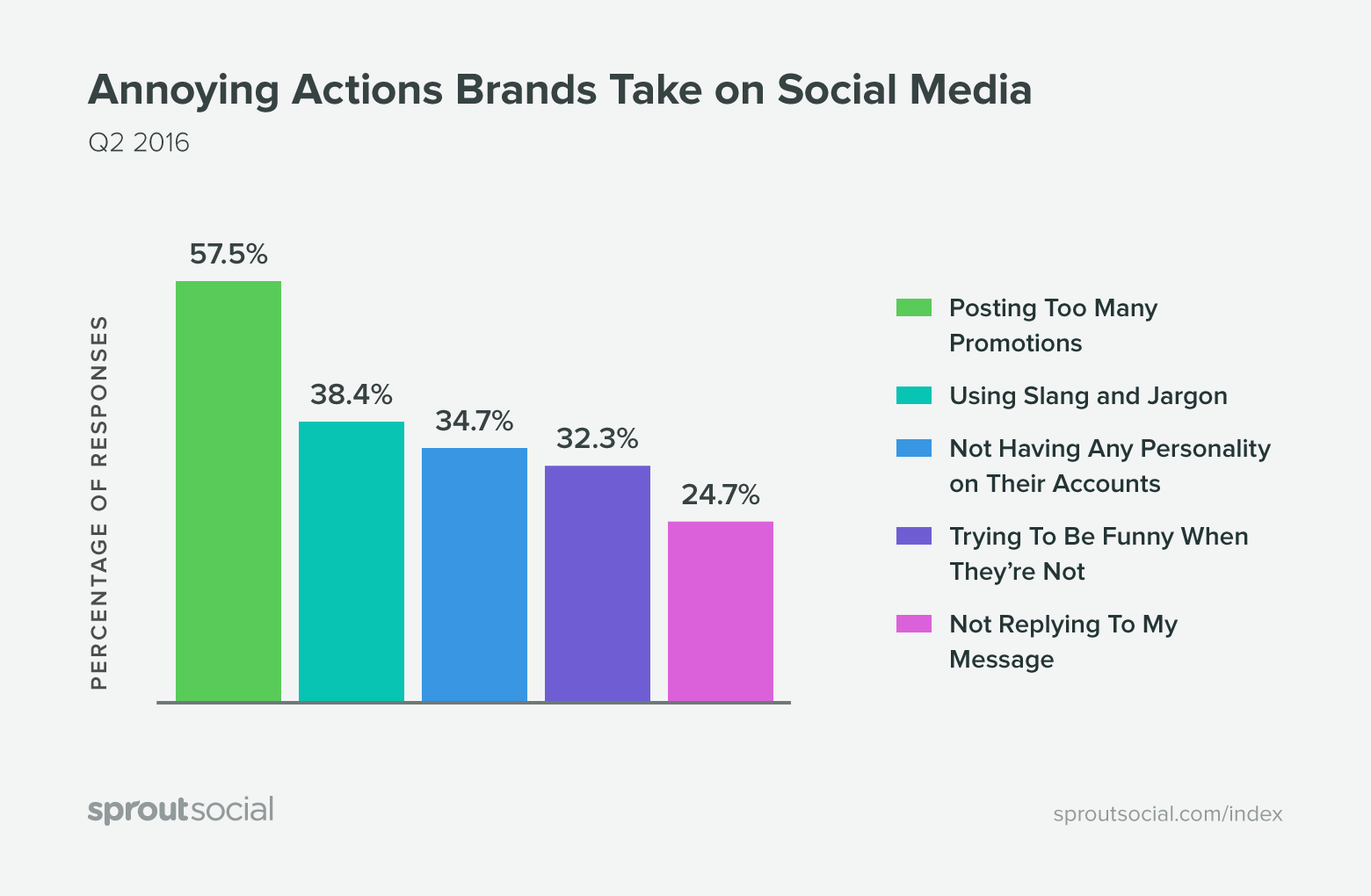
If you are a brand that does happen to have a lot of content, Stories are a great place to take advantage of that, instead of bombarding your actual profile with too many posts. Over-posting on Stories is something you shouldn’t stress about in comparison to your regular feed with their limited lifespan
And don’t worry about the production value of these images. They’re meant to be a quick moment which means you don’t have to stress as much about how they look either.
Have even more questions on getting started with Instagram Stories or putting together an editorial calendar that works for your brand? Give us an email and we’d be happy to chat.