
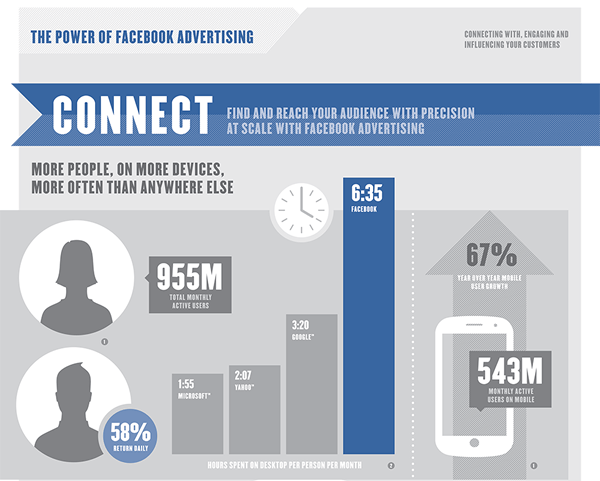
As stated in my previous post, Facebook is not going anywhere. And in fact, the number of users is consistently growing, which means the number of advertisers and dollars is also increasingly. Nearly $8 billion in advertising to be exact.
As a business, you cannot afford to not take advantage of an easy to use marketing opportunity that allows you to target specific audiences based on real time, and real life, data.
So just how do you go about setting up a Facebook ad anyways? Good question. Below I’ve listed 5 basic steps that are required to set up an ad. This is by no means an extensive list that includes every possible option that is available. It is merely a tool to help businesses get started with a basic ad if they’ve never placed one before.
1: Establish a Facebook Business Page
If you already have a page setup, kudos, you can skip ahead. For those who don’t, before you can begin advertising on Facebook, you need to have established a business page that the ads will be linked to. To do this, you’ll have to have someone login through their personal account, click on Create A Page, fill out the information pertaining to your company (website, email, address, hours, etc), add creative profile and cover images, and you’re good to go.
Side note: once you’ve created your page, or even if it’s been up and running for years, implementing a strategic content strategy plan and calendar for your posts will also be imperative to effective Facebook advertising efforts.
2: Define Your Ad Goals and Objectives
Similar to traditional advertising, you’ll want to figure out what your end goal is by creating an ad. On Facebook, they lay out a few options for you that make it easy when creating the ad:
- Drive traffic directly to a website/webpage
- Drive traffic to your Facebook page (encourages page Likes)
- Drive engagement on a specific post (also called boosted post)
- Promote a specific event
- Advertise your location/business to people who are in the near vicinity
A good way to start with this is to just ask yourself, why are we setting up this ad, and what do we hope to achieve out of it? Even if your goal is to just spread the word about your company (maybe you’re a startup) and to get your business name in front of people, that’s still a goal that you can put specific content and copy behind with targeted demographics.
3: Create A Custom Ad
Just like a traditional advertisement, you’ll want to think carefully about your image, headline, copy and CTA (call to action). Depending on the style of ad that you chose (based on your goal) you might be limited with the amount of text that you can have in the post copy, so make sure you pay attention to what words you’re choosing (make every word count).If you’re adding text to your graphic, make sure you follow Facebook’s 20% rule—only 20% of your image can contain text. To double check an image you’ve created, upload your image on this webpage and it will tell you what percentage you’re at.
Some other good rules of thumb for ad creative are:
- Keep it short—Facebook users have short attention spans, so keep your copy concise and to the point
- Clear photos (NO clipart)
- Follow your company’s or products brand style so it’s easy to recognize even if they don’t immediately notice the company name
4: Target Your Audience
This is where the beauty of Facebook advertising comes into play. There are a plethora of options that you can choose to narrow down your target audience. You can go as simple as location (down to just a few mile radius around a specific address) or male versus female, all the way down to are they a trendy stay-at-home mom who graduated from college and likes organic foods and yoga. You’ll notice that once you start entering and choosing options from location, age, interests and behaviors, the number on the right-hand side of your page will reflect the total number of people that are within your audience. Obviously the more targeted you can get, the better your ad will do; too general of an ad might be seen by a ton of people, but it will lose power if it’s something that that viewer might not be interested in.
With Facebook ads, another awesome element of it is that you can choose the dollar amount that you want to put towards an ad. Which means if you’re looking to test an ad in different audiences to see which responds better, you can chose a lower dollar amount and repeat the ad to multiple audiences and compare results, all with ease.
5: Place Your Order
After you’ve set up your goal, demographics and creative, you’re going to need to setup the timeline of your ad, as well as how much money to put behind it. For a beginner, setting up a lifetime budge is the best option. This means that you chose a total dollar amount, the days that you want the ad to run, and Facebook will do the rest for you. Underneath all of this Facebook uses per click or per 1000 impressions per dollar amount to determine how many people will see your ad on a given day. Once you’ve mastered basic ads, you can go in and adjust these bid amounts yourself, but I highly recommend saving that for later.
One good thing to also note at this time, is that any time during an ad’s timeline, you can pull the ad completely or put it on hold. This is a great option if you find that your ad is not performing properly.
After you hit submit, your ad will be under review by the Facebook staff. Once it is approved (or disapproved) you will receive an email notification and it will go into effect immediately.
Once your ad is off an running, be sure to check in on it—I suggest daily at first to see how your numbers are doing. Monitoring your ads will be imperative for determining your results and how it has impacted your goal, as well as how you setup future ads.
Questions about anything you read? Need more clarification? Concerned you’re running the wrong ad to the wrong people? Shoot me an email or a Facebook message and we’d be happy to chat with you about your Facebook advertising strategy.
Written by Alison Eiler
Marketing Coordinator
Alison@FullTiltMarketing.net
